


Interview scheduling looks simple until you're managing 40+ interviews a week across 8 interviewers with completely different availability patterns. Then it turns into a coordination mess that bleeds time from everyone involved.
Most recruiting teams don't realize the process is broken until they're drowning in reschedules, no-shows are sitting at 15%, and candidates are complaining. The problem isn't just inefficiency—it's that manual scheduling creates compounding friction that gets worse as volume grows.
What makes it particularly messy is the multi-party coordination. You're juggling candidate availability, interviewer calendars, room bookings, panel requirements, and time zone differences all at once. Each added constraint multiplies complexity. A simple phone screen becomes a 12-email thread. A panel interview turns into a week-long scheduling puzzle.
The real cost shows up in your metrics. No-show rates climb because candidates get confused by back-and-forth emails. Time-to-fill stretches because scheduling adds 3-4 days between each stage. Interviewer utilization drops because load distribution is basically random. And your recruiting coordinators end up spending more than half their time on scheduling logistics instead of actually engaging candidates.
Why standard calendar tools fall apart at interview volume
Calendar tools weren't built for high-volume interview coordination. They assume single-party scheduling—one person controlling one calendar. Interview scheduling requires orchestrating multiple calendars while respecting business rules that change by role, stage, and interviewer.
What typically happens: recruiters manually check interviewer calendars, find available slots, email candidates with options, wait for responses, discover the slots are now taken, and restart the whole thing. Each interview takes 6-8 touches to schedule. At 40 interviews per week, that's 280+ scheduling interactions eating up coordinator time that could go toward candidate relationships.
Manual processes create several failure points. Interviewers get double-booked because calendar checks happen at different times by different people. Popular interviewers get overloaded while others stay idle. Candidates receive conflicting information when multiple coordinators are working the same req. Time zones get botched. Reminder emails get forgotten entirely.
Even shared booking links don't solve it. Interviewers share personal links and candidates grab whatever slots they want, regardless of stage or priority. Or teams use generic booking pages that ignore interviewer specialization, panel requirements, or any kind of capacity limits.
Building an interviewer capacity model that actually works
The foundation of scheduling optimization is understanding your true interviewer capacity—not just "how many hours are free" but realistic capacity that accounts for prep time, debrief time, and the mental fatigue that comes from back-to-back evaluations.
Eliminate HR bottlenecks with smart automation.
Hiryly simplifies your HR operations so you can focus on people, not paperwork.
- Centralized candidate tracking
- Automated onboarding workflows
- Performance & compliance dashboards
No credit card required
Start by mapping your interviewer pool into capacity tiers:
Tier 1: Dedicated interviewers (recruiters, hiring managers)
-
Can handle 15-20 interviews per week
-
Include 15-minute buffers between interviews
-
Block focus time for scorecards and debriefs
Tier 2: Regular panelists (team leads, senior staff)
-
Target 5-8 interviews per week maximum
-
Protect at least 3 continuous hours of meeting-free time daily
-
Require 24-hour advance notice for bookings
Tier 3: Occasional interviewers (executives, specialists)
-
Limit to 2-3 interviews per week
-
Book only during designated interview blocks
-
Require 48-hour advance notice
Calculate actual capacity with this formula: Available hours × 0.7 (fatigue factor) ÷ (interview duration + 15 min prep + 15 min debrief)
For example, an interviewer with 10 hours available weekly for 60-minute interviews: 10 × 0.7 ÷ 1.5 hours = roughly 4-5 interviews per week
This realistic number becomes your hard scheduling constraint. Push beyond it and you get interviewer burnout, rushed evaluations, and a candidate experience that quietly deteriorates.
Load balancing strategies to prevent interviewer burnout
Once you know capacity, you need distribution rules that actually spread the load. Random assignment creates hotspots—some interviewers get slammed every week while others barely show up in the rotation.
A points-based system works well here:
| Interview Type | Points | Typical Duration | Recovery Time |
|---|---|---|---|
| Phone Screen | 1 | 30 min | 15 min |
| Technical Screen | 2 | 60 min | 30 min |
| Panel Interview | 3 | 90 min | 30 min |
| Executive Interview | 2 | 45 min | 15 min |
| Culture Fit | 1 | 45 min | 15 min |
Track weekly points per interviewer with targets tied to their tier. Tier 1 interviewers might absorb 15-20 points weekly, Tier 2 gets 8-12 points, Tier 3 stays under 6.
Build assignment rules into your scheduling process:
-
Route interviews to the interviewer with the lowest current weekly points
-
Respect skill requirements (technical screens need technical interviewers)
-
Keep a 20% capacity buffer for urgent additions
-
Rotate difficult time slots—early morning, late afternoon—fairly across the team
Fallback rules matter too. When primary interviewers aren't available:
-
Check same-skill interviewers in order of current load
-
Escalate to next tier if no one's available within SLA
-
Offer the candidate alternative times before switching interviewers
-
Document any substitutions so the hiring manager isn't caught off guard
Here's a simple workflow for assigning interviews based on points and capacity.
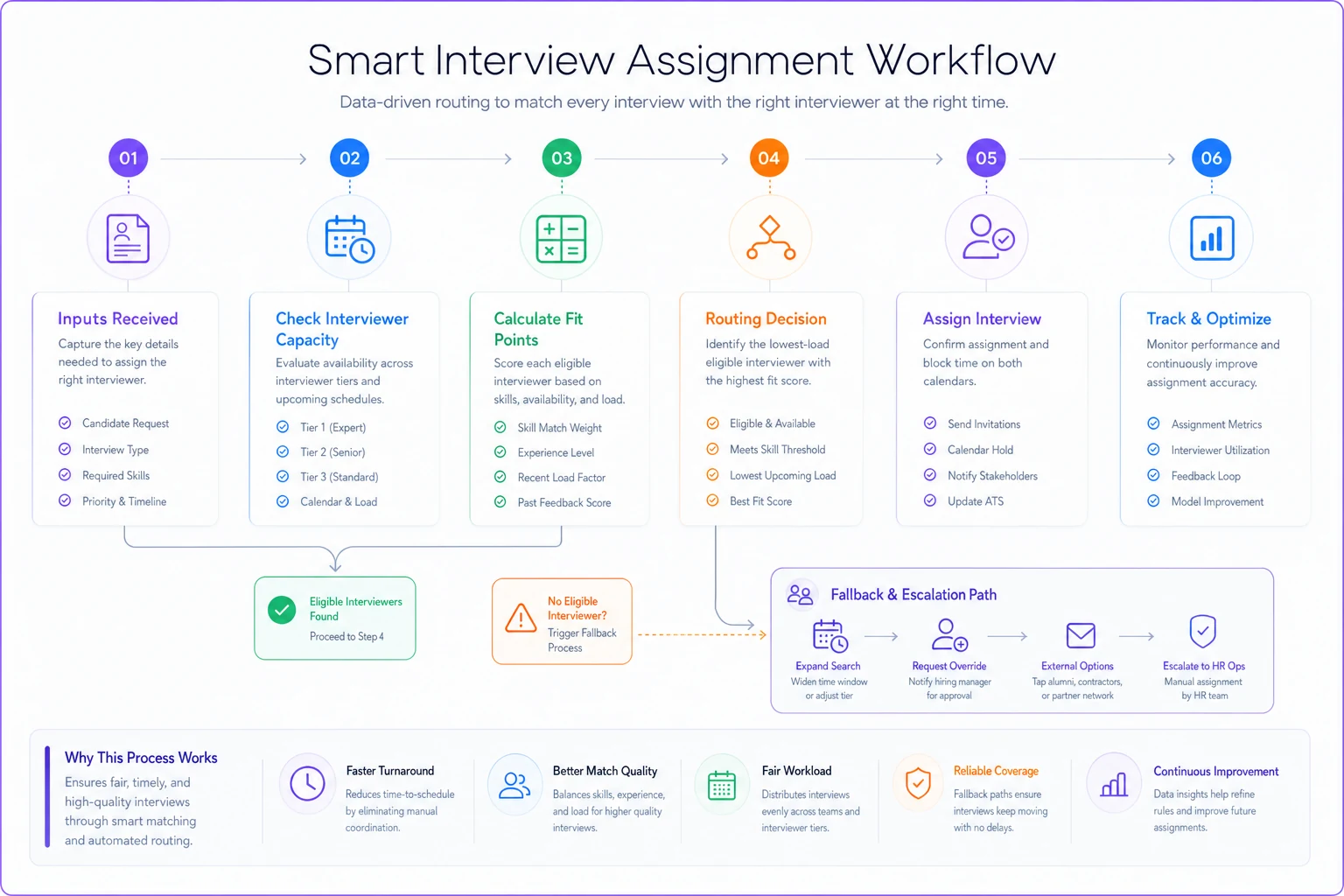
When primary options fail, the escalation path keeps scheduling moving without surprise substitutions for hiring managers.
SLA framework for every interview stage
SLAs transform scheduling from best-effort to something you can actually manage and improve. Define specific targets for each interaction:
Initial response SLA: Respond to interview requests within 4 business hours
Scheduling completion SLA: Confirm interview time within 24 hours of initial request
Stage progression SLA: Schedule next interview within 48 hours of previous stage completion
Break SLAs down by stage since urgency varies significantly:
Phone screens: 24-hour scheduling SLA
-
High volume, low complexity
-
Use automated scheduling tools
-
Allow self-service booking
Technical assessments: 48-hour scheduling SLA
-
Requires specific interviewer skills
-
May need equipment or room setup
-
Coordinate with technical team availability
Final rounds: 72-hour scheduling SLA
-
Multiple stakeholders involved
-
Often requires executive calendars
-
May involve travel coordination
Monitor SLA performance weekly. When you start missing targets consistently, it signals capacity problems or process breakdowns—not just a bad week. A dashboard showing SLA attainment by stage helps you catch bottlenecks before they become critical.
The no-show prevention system that actually reduces ghosting
No-shows waste everyone's time and quietly kill hiring velocity. A structured prevention system can cut no-show rates from 15% down to under 5%—not by being aggressive, but by staying present.
Multiple touchpoints across different channels is the key:
Confirmation sequence (immediately after scheduling):
-
Calendar invite with clear joining instructions
-
Text confirmation request within 2 hours
-
Email with interview prep materials
48-hour reminder:
-
Email highlighting what to prepare
-
Text asking to confirm attendance
-
Include rescheduling link if needed
24-hour reminder:
-
Automated text with joining details
-
Email with interviewer names and LinkedIn profiles
-
Final confirmation request
Day-of reminder (2 hours before):
-
Text with direct joining link
-
Quick email reminder
-
Backup contact info if issues arise
Track confirmation rates at each touchpoint. If someone doesn't confirm at the 48-hour mark, reach out proactively. Most of the time it's not that they're bailing—they're just distracted. That early warning gives you time to reschedule before the no-show happens.
Reminder and cancellation scripts that keep candidates engaged
Generic reminder emails get ignored. These templates keep things personal without requiring extra effort every time:
Initial confirmation template: "Hi [Name], your [Interview Type] with [Company] is confirmed for [Date/Time]. You'll be meeting with [Interviewer Name], who leads our [Team/Department]. They're particularly interested in discussing your experience with [Relevant Skill]. I've attached some prep materials that previous candidates found helpful. Reply 'YES' to confirm you'll be there."
48-hour reminder template: "Quick reminder about your interview this [Day] at [Time]. [Interviewer Name] is looking forward to learning about your background in [Specific Area]. The interview will cover [Brief Agenda]. Still good for this time? Just reply to confirm, or let me know if something's come up."
Rescheduling template (when interviewer cancels): "I need to reschedule your [Day] interview due to an unexpected conflict. I have three alternative times that work with the same interviewer: [Option 1], [Option 2], [Option 3]. Which works best for you? I know schedule changes are frustrating—we'll make sure the new time sticks."
No-show follow-up template: "We missed you at today's interview. If something unexpected came up, no worries—these things happen. I'm holding [Two Time Options] tomorrow if you'd like to reschedule. Let me know by [Time] if either works, otherwise we'll close out this opportunity."
Keep templates conversational but informative. Reference specific details—the role, the interviewer, the topic areas—so it's obvious this isn't a mass email blast. Personalization tokens should go beyond just the name.
Measurement framework to track scheduling performance
Build a metrics dashboard that actually captures what's happening:
Efficiency metrics:
-
Average time to schedule (request to confirmation)
-
Number of touchpoints per scheduled interview
-
Rescheduling rate by stage
-
Coordinator utilization rate
Quality metrics:
-
No-show rate by source and stage
-
Candidate satisfaction with scheduling process
-
Interviewer satisfaction scores
-
On-time interview start rate
Capacity metrics:
-
Interviewer utilization by tier
-
Weekly interview capacity vs. actual
-
Bottleneck stages (where scheduling takes longest)
-
Peak demand periods
Calculate your scheduling friction score: (Reschedules + No-shows + Late starts) ÷ Total interviews × 100
Anything above 20% points to systematic problems. Track it weekly so you catch trends before they become crises.
For interviewer health, monitor a burnout risk score: (Actual interviews ÷ Capacity) × (Consecutive days with interviews ÷ 5) × 100
Scores above 120 are a reliable predictor of interviewer fatigue and declining interview quality. It's a small thing to track and a big thing to ignore.
Technology integration without losing the human touch
AI-powered scheduling platforms can handle routine coordination while your team stays focused on candidate relationships. The key is being deliberate about what you automate.
Automate these tasks:
-
Calendar availability checking
-
Time zone conversions
-
Reminder sending
-
Basic rescheduling requests
-
Load balancing calculations
-
SLA tracking and alerts
Keep these human:
-
Executive interview coordination
-
Complex panel scheduling
-
Sensitive rescheduling situations
-
VIP candidate handling
-
Escalation management
The better scheduling platforms reduce coordinator workload significantly while actually improving candidate experience—because the mechanical stuff gets handled faster and more consistently than any human can do it manually. Coordinators shift from data entry to judgment calls.
Look for platforms that integrate with your ATS and calendar systems. The better ones learn your scheduling patterns over time, flag no-show risk early, and adjust reminder cadences based on candidate behavior rather than a fixed schedule.
Common pitfalls that derail scheduling optimization
Even with good intentions, these mistakes kill scheduling improvement projects:
-
Over-automating too quickly
Teams flip on full automation before establishing any baseline. Start with one interview type, measure it, then expand.
-
Ignoring interviewer feedback
Interviewers push back against systems that treat them like interchangeable slots. Include them in capacity planning and actually respect their preferences.
-
Rigid SLAs without seasonal flexibility
Forcing 24-hour SLAs during peak hiring creates stress without improving outcomes. Build in seasonal adjustments.
-
Measuring speed instead of quality
Focusing purely on time-to-schedule while ignoring candidate or interviewer experience just trades one problem for another.
-
Underestimating change management
Coordinators who've been doing this manually for years don't adopt new systems because you told them to. Show them how automation handles the tedious parts so they can do more interesting work.
Avoid these traps and you're far more likely to get adoption and real improvements.
Making the business case for scheduling investment
Here's how to build the ROI case:
Calculate current scheduling cost:
-
Coordinator time
20 hours/week × $25/hour = $500/week
-
No-show cost
5 no-shows/week × 1 hour × $150/hour (interviewer time) = $750/week
-
Candidate drop-off
2 lost candidates/month × $8,000 replacement cost = $16,000/month
Even a 30% efficiency improvement delivers real savings. But the bigger case is competitive. When you can schedule within 24 hours and competitors take a week, you win candidates—especially the ones with multiple offers on the table.
Track these metrics to demonstrate impact:
-
Time-to-fill reduction
-
Offer acceptance rate improvement
-
Candidate NPS scores
-
Interviewer retention rates
-
Cost-per-hire reduction
Teams that fix their scheduling process typically see time-to-fill drop by 4-6 days and candidate experience scores improve meaningfully. Those aren't small numbers when you're competing for the same candidates.
Moving from reactive scheduling to proactive capacity planning
The goal isn't just handling today's interview load better—it's predicting and preparing for what's coming. That requires shifting from reactive scheduling to proactive capacity management.
Build a rolling 4-week capacity forecast based on:
-
Open reqs and expected interview stages
-
Historical conversion rates between stages
-
Seasonal patterns in candidate flow
-
Interviewer PTO and upcoming commitments
Use the forecast to make proactive adjustments:
-
Train backup interviewers before peak periods hit
-
Negotiate dedicated interview blocks during busy seasons
-
Adjust SLAs based on predicted volume rather than reacting after the fact
-
Pre-book executive calendars for final rounds weeks in advance
This forward-looking approach prevents the feast-or-famine cycles that exhaust recruiting teams. Instead of scrambling when interview volume spikes, you're ready.
Interview scheduling might seem like a minor operational detail, but it's often the difference between a smooth hiring process and a chaotic one. The compound effect of less friction at every touchpoint—faster booking, fewer reschedules, minimal no-shows—changes the entire recruiting operation.
Start with the capacity model and SLAs. That's the foundation everything else builds on. Add load balancing and reminder sequences once the basics are solid. Then layer in measurement and technology to scale what's working.
And keep in mind that closing the offer-to-onboard gap starts well before the offer—it starts with a candidate experience that felt organized and respectful of their time. When candidates aren't chasing down interview details and interviewers aren't burned out, everyone performs better. Better conversations, better decisions, faster hiring.
The teams getting this right aren't necessarily running the biggest budgets or the fanciest tools. They're the ones who treat scheduling as a strategic capability instead of an administrative afterthought. Whether through tighter processes, smarter templates, or AI-assisted platforms, they've stopped letting scheduling be the thing that slows everything else down.
Your candidates are forming impressions of your company from the very first scheduling email. Make sure that impression is the right one.
Ready to transform your HR processes?
Join thousands of HR teams using Hiryly to hire faster, engage employees better, and stay compliant effortlessly.