


Most migration disasters don't happen on cutover day. They happen three weeks earlier, when someone assumed the requisition data would map cleanly and nobody actually checked. Then go-live arrives, a recruiter tries to move a candidate to the offer stage, and the stage doesn't exist in the new system. Now you've got 40 candidates in limbo, two managers asking where their reqs went, and a payroll deadline that doesn't care about your project plan.
The uncomfortable truth is that the vendor's implementation plan is almost never the same as your operational plan. The vendor cares about getting data into their platform. You care about not losing a single candidate, not missing a single start date, and not breaking the trust of hiring managers who were already skeptical about the change. Those are different objectives, and the gap between them is where hiring stalls.
This is a quartered playbook — readiness, data mapping and reconciliation, cutover runbook, and rollback — built specifically to protect the parts of the operation that touch live candidates and new hires. Not the whole migration. Just the parts where a mistake means someone's job offer evaporates or someone shows up on day one with no laptop, no accounts, and no manager who knew they were coming.
Why hiring is the worst thing to migrate around
HR tech is different from migrating a CRM. Your data isn't static. While you're migrating, candidates are still applying, interviews are still being scheduled, offers are still going out, and people are still onboarding. You're changing the engine while the car is moving, and the passengers are real people with competing offers and start dates.
What tends to get missed in these projects is that teams plan for the data being in motion but forget that the people using the data are also in motion. A recruiter mid-negotiation with a strong candidate doesn't want to hear "the system's down this weekend, hold off." A candidate who accepted a verbal offer on Thursday expects the written one on Monday. If your cutover window swallows that, you don't just have a data problem — you have a candidate who ghosts you for the other company that moved faster.
The second thing that makes this hard is that HR tech is rarely one system. You've got an ATS, an HRIS, maybe a separate payroll platform, background check integrations, e-signature tools, and a dozen point solutions for scheduling, assessments, and onboarding. They talk to each other through integrations usually held together with API keys nobody documented. Migrate one piece and three others quietly break. The candidate who cleared their background check in the old system? That "clear" status doesn't always carry over, and now onboarding is waiting on a check that already happened.
The three failure zones
-
In-flight candidates — anyone actively moving through stages when cutover happens. These are the highest risk because they're time-sensitive and relationship-driven.
-
In-flight new hires — accepted offers not yet onboarded, or people mid-onboarding. These fail quietly. Nobody notices until a start date is missed or provisioning didn't trigger.
-
Historical and compliance data — the stuff you don't touch daily but absolutely need for audits, EEO reporting, and disputes. This fails silently and shows up months later.
You plan differently for each. In-flight candidates need speed and continuity. In-flight new hires need coordination across systems. Historical data needs accuracy and reconciliation. One plan that treats all three the same will fail at least one of them.
Quarter 1: The readiness checklist
Readiness isn't about the software being ready. It's about knowing whether you can afford to break things and for how long. Before anyone exports a single record, you need to understand your operational floor — the minimum hiring activity you cannot stop.
Eliminate HR bottlenecks with smart automation.
Hiryly simplifies your HR operations so you can focus on people, not paperwork.
- Centralized candidate tracking
- Automated onboarding workflows
- Performance & compliance dashboards
No credit card required
One pattern worth flagging: teams schedule migrations for "quiet periods" that turn out not to be quiet. December looks slow until you remember every January-start offer needs to go out in the next two weeks. End of quarter looks fine until sales hiring spikes because someone needs headcount before the new fiscal year. Pull your actual hiring volume by week for the last 18 months before you pick a window.
Readiness checklist to sign off on before green-lighting anything:
-
Hiring volume map — weekly req and offer volume for the past 18 months, so you pick a genuinely low window, not a mythical one
-
In-flight inventory — a live count of candidates in each stage, offers pending, and new hires mid-onboarding as of the freeze date
-
Integration inventory — every system that reads from or writes to the platforms you're moving, including the undocumented ones
-
Owner map — a named human for every data domain (reqs, candidates, offers, onboarding, comp, EEO). Not a team. A person.
-
Access matrix confirmed — who gets what permissions in the new system, mapped and tested before go-live, not scrambled together after
-
Compliance data scope — a documented list of what must survive migration for audit and reporting purposes
-
Comms cadence agreed — who tells recruiters, managers, and candidates what, and when
-
Rollback threshold defined — the specific conditions that make you abandon the new system and revert (more on this later)
That access matrix point deserves emphasis. Getting permissions wrong at cutover is one of the fastest ways to stall hiring, because a recruiter locked out of requisitions can't do anything. If you don't already have a structured approach to who-can-see-what, the thinking in HR data governance for HR teams is worth borrowing directly here — the same access-control logic that governs day-to-day operations should govern who gets provisioned in the new platform, and provisioning should happen before go-live so nobody's testing it live.
Provisioning should happen before go-live so nobody's testing it live.
When to just not migrate right now
Sometimes readiness tells you the honest answer is "not yet." If you're in the middle of a hiring surge, if you have more than a handful of executive or critical-role searches in final stages, or if a compliance audit is scheduled within 90 days — push the date. A delayed migration costs you project momentum. A botched one during peak hiring costs you candidates, manager trust, and possibly an audit finding. The second is far more expensive.
Quarter 2: Data mapping and reconciliation
This is the quarter everyone underestimates. Data mapping isn't a spreadsheet exercise where you draw lines between old fields and new fields. It's a translation problem, and translation is where meaning gets lost.
The classic example: your old ATS has a stage called "Offer — Verbal." The new system has "Offer Extended." Those sound equivalent. They're not. In your process, "Offer — Verbal" might mean legal hasn't approved the written offer yet, and moving someone to "Offer Extended" in the new system might auto-trigger the e-signature workflow. Now candidates are receiving formal offers before approval. That's not a data problem you fix later — that's a compliance and reputation problem you created on day one.
Build a field-level mapping table
You need a mapping table, and it needs to be more honest than the vendor's default template. For every field that touches a live candidate or new hire, document not just where it goes but what happens when it lands there.
| Data domain | Old field/value | New field/value | Transformation risk | Triggers on import? |
|---|---|---|---|---|
| Candidate stage | "Offer — Verbal" | "Offer Extended" | High — semantic mismatch | Yes — auto e-sign |
| Background check | "Clear" | "Passed" | Medium — status label change | No, but blocks onboarding if blank |
| Req status | "On Hold" | "Paused" | Low | No |
| Start date | Free-text | Date field | High — format failures | Yes — provisioning |
| Comp offered | Currency string | Numeric + currency code | Medium — parsing errors | No |
| EEO responses | Coded values | Different coding scheme | High — compliance impact | No |
The "triggers on import" column is the one people forget. Importing data into a modern platform often fires automations. A start date landing in the new system might kick off IT provisioning, welcome emails, and manager notifications. Import 200 historical records with old start dates and you've just spammed everyone and possibly re-triggered onboarding for people hired two years ago. Turn automations off during bulk import, then turn them back on deliberately.
The reconciliation plan
Mapping is what you intend to happen. Reconciliation is proving it actually happened. Skipping the second is how you discover in March that half your Q4 offers have no comp data attached.
-
Count reconciliation — record counts by domain in old vs. new. Do the numbers match? If you had 1,240 active candidates and the new system shows 1,190, you've lost 50 people and need to find them before go-live.
-
Stage reconciliation — does the distribution of candidates across stages match? A shift where 80 candidates all landed in the wrong stage will show up here even when total counts match.
-
Spot-check sampling — pull a random sample of 30–50 records across domains and manually verify every field. Weight the sample toward in-flight candidates and recent hires, because those are the highest-stakes records.
-
Critical-record full check — for anyone with a pending offer or an upcoming start date, check every field, no sampling. These can't be wrong.
-
Sign-off by owner — each domain owner from your readiness map signs off on their own reconciliation. No collective shrug.
That in-flight population is where reconciliation pays for itself. The offer-to-onboard window is fragile even without a system migration happening underneath it — the timing discipline covered in closing the offer-to-onboard gap becomes much harder to hold when the underlying platform is changing. Protect that population first, and reconcile it record by record.
Quarter 3: The cutover runbook
A runbook isn't a plan. It's a minute-by-minute script that a tired person can follow at 11 p.m. on a Saturday without making judgment calls. The whole point is to remove judgment from the moment when judgment is worst.
Two decisions shape everything: how long the freeze lasts, and whether you do a hard cutover or run parallel.
A hard cutover means the old system goes read-only, everyone moves to the new one, done. Cleaner, cheaper, riskier. If something's wrong, you're already committed.
A parallel run means both systems stay live for a window, with new activity in the new system and the old one available as a reference. Safer, but expensive and confusing — recruiters aren't sure which system is truth, and data drifts between them. Parallel only makes sense if your team is small enough to coordinate tightly, or your volume is high enough that a hard cutover failure would be catastrophic.
The freeze window is a candidate-experience decision
The instinct is to make the freeze as short as possible. Better instinct: make the freeze invisible to candidates. During the freeze, no new requisitions and no bulk changes — but you keep manual paths open for the things candidates actually feel. A recruiter can still email an offer manually. A coordinator can still schedule an interview by hand and back-fill it into the new system after. The freeze protects the data; the manual workaround protects the relationship.
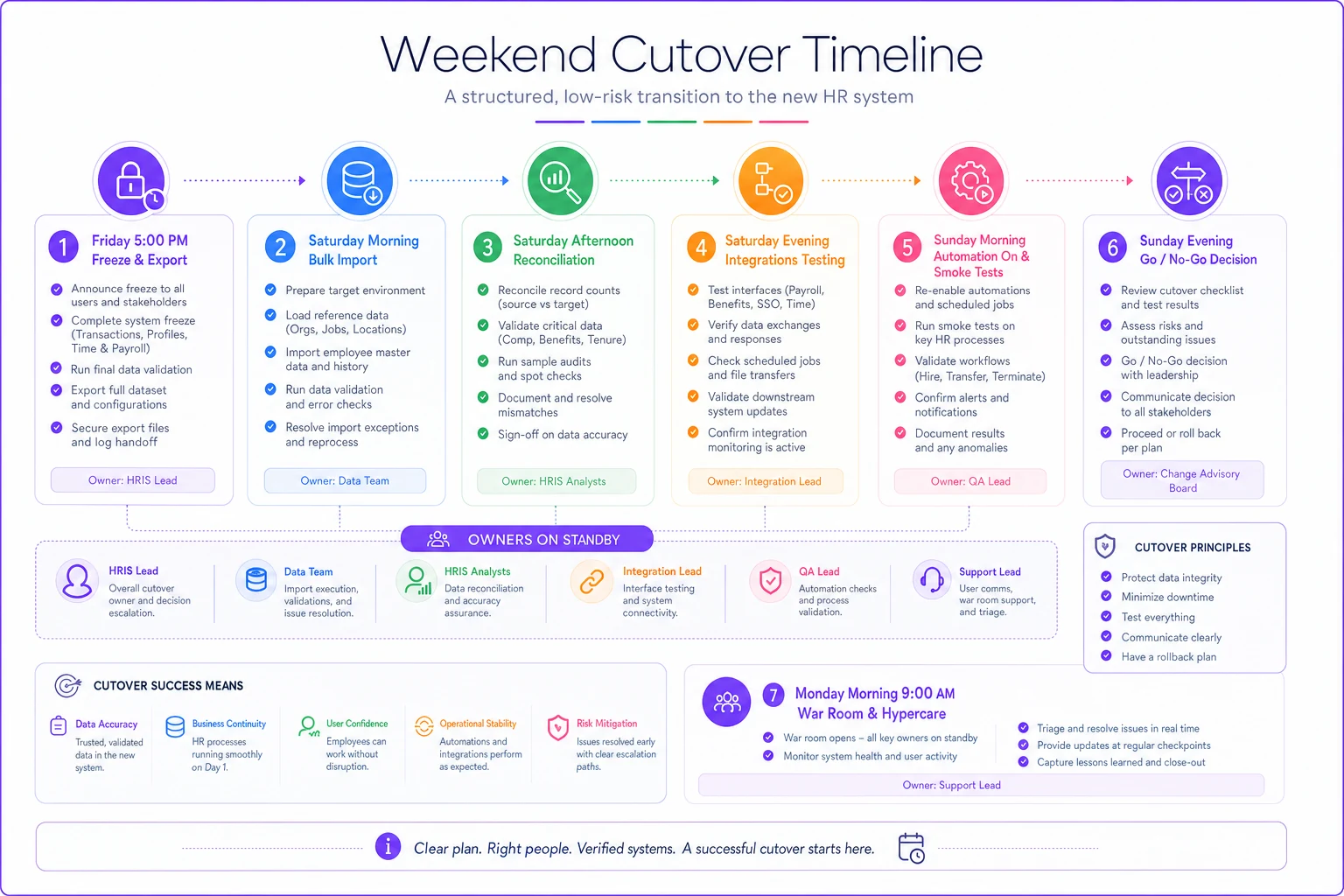
A realistic cutover sequence for a weekend go-live:
[GRAPH: Weekend Cutover Timeline — Friday 5pm through Monday Morning War Room]
-
Friday 5 p.m. — Freeze begins. Old system set to read-only. Announce to all users. In-flight inventory snapshot captured.
-
Friday 6 p.m. — Final data export. Automations in new system confirmed OFF.
-
Saturday morning — Bulk import runs. Count reconciliation immediately after.
-
Saturday afternoon — Stage reconciliation and critical-record full check. Owners begin sign-off.
-
Saturday evening — Integrations reconnected one at a time, each tested with a single test record before enabling fully.
-
Sunday morning — Automations turned back on, one workflow at a time. Test each with a throwaway record.
-
Sunday afternoon — Full team smoke test
create a req, move a candidate through every stage, generate a test offer, trigger a test onboarding.
-
Sunday evening — Go/no-go decision against rollback criteria. If go, unfreeze and announce.
-
Monday morning — War room. Owners on standby. Recruiters and managers briefed on where to report anything broken.
That Monday war room matters more than people expect. Most real problems surface not in testing but when 30 recruiters start doing real work in unpredictable ways. Having owners on standby for the first couple of days means a broken workflow gets fixed in an hour instead of festering for a week.
Quarter 4: Rollback criteria — decide before you're emotional
Rollback is the part nobody wants to plan because planning it feels like admitting the project might fail. But the reason you define rollback criteria in advance is precisely so the decision isn't made emotionally at 9 p.m. Sunday by a team that's exhausted and invested and desperate to just be done.
The rule: rollback triggers must be objective and written before cutover. "It feels broken" is not a criterion. "More than 5% of in-flight candidate records failed reconciliation" is.
Reasonable rollback triggers:
-
Any pending offer record is missing comp, start date, or candidate contact info and can't be reconstructed within the window
-
More than a small threshold — say 5% — of in-flight candidates failed stage reconciliation
-
A compliance-critical data domain (EEO, background check status) failed reconciliation
-
A core workflow — create req, extend offer, trigger onboarding — cannot be completed in the smoke test
-
Integrations to payroll or background check cannot be restored before the next business day
Here's the operational nuance most teams miss: rollback has its own risk. If your team was doing manual work during the freeze — sending offers by email, scheduling interviews by hand — that activity has to be reconciled back into the old system if you revert. So a real rollback plan includes a "revert reconciliation" step. Roll back without it and you've just lost every action taken during the freeze window. Which means before you ever start, someone should be logging every manual action taken during the freeze in a simple shared sheet, so a rollback has something to reconcile against.
Who should not attempt a big-bang migration
Not every team should do a single-weekend cutover of everything at once. Skip the big bang if:
-
You have no dedicated owner per data domain — unclear ownership is how records fall through cracks
-
Your integrations are undocumented and nobody currently on staff built them
-
You're inside 90 days of a compliance audit or in the middle of a hiring surge
-
You genuinely cannot afford any freeze window, even a 48-hour one
For these teams, a phased migration — move historical data first, then non-urgent domains, then finally the in-flight population once the platform is proven — is slower and less elegant, but it never puts your entire active pipeline at risk on a single night.
Communications: the templates that keep trust intact
Migrations break trust faster through silence than through actual bugs. A recruiter who hits a broken workflow and was warned it might happen files a ticket. A recruiter who hits the same thing with no warning assumes the whole project was botched and tells everyone. Same bug, completely different organizational damage.
You need three audiences and three cadences:
| Audience | What they need to know | When |
|---|---|---|
| Recruiters / coordinators | Freeze window, manual workarounds, where to report issues, war-room hours | 2 weeks before, day before, morning of go-live |
| Hiring managers | That reqs are safe, timelines may shift slightly, who to contact | 1 week before, day after go-live |
| Candidates (in-flight only) | Nothing about the migration — just continued normal contact | No migration mention; recruiters maintain normal touchpoints |
That last row is deliberate. Candidates should never hear the word "migration." From their side, the process should look completely normal. The moment a candidate hears "we're switching systems so there might be a delay," you've handed them a reason to prefer the competitor who didn't say that. The comms work is internal; the candidate experience stays boringly smooth.
> "Heads up — we're moving to [new platform] this weekend. From Friday 5 p.m. to Monday 9 a.m., don't create new reqs or make bulk changes in [old system]. If you need to send an offer or schedule an interview during that window, do it manually and log it in [shared sheet] so we can sync it after. Monday morning, [owner names] are on standby — report anything that looks off in [channel] and we'll fix it fast."
Clear, short, tells them exactly what to do and where to go when something breaks. That's the whole job.
A real scenario
A mid-sized company — around 400 employees, hiring roughly 15–20 people a month — moved from a standalone ATS to an integrated HRIS-plus-ATS platform. Their first plan was a single big-bang weekend cutover of everything, scheduled for early December because "hiring's slow then."
Two things surfaced during readiness. First, the hiring-volume map showed December wasn't slow at all — they had about a dozen January-start offers that needed to go out mid-month. Second, they had roughly 30 candidates in active offer or onboarding stages, and their background-check integration was built by a contractor who'd left a year earlier.
They changed the plan. Moved the window to late January, ran a phased approach — historical data first, verified over two weeks, then the in-flight population last with record-by-record reconciliation on all 30 active candidates. During the 48-hour freeze, two offers went out manually and got logged.
The outcome wasn't dramatic, which was the point. No candidate experienced a delay they noticed. One onboarding automation double-fired and re-sent a welcome email to a recent hire — caught Monday morning by the war room, apologized for, forgotten by Tuesday. Total in-flight records lost: zero. The earlier plan, run in December against a peak they hadn't measured, would almost certainly have dropped at least a few of those January offers.
Pulling it together
A migration is a coordination problem wearing a data problem's clothing. The export-import mechanics are the easy part — vendors are genuinely good at that now. What breaks is the coordination: between systems that trigger each other unexpectedly, between the freeze and the candidates who don't care about your freeze, between an exhausted team and a rollback decision that should have been made objectively hours earlier.
Quarter it out — readiness tells you whether and when, mapping and reconciliation tell you what actually moved, the runbook removes judgment from the worst moment, and rollback criteria decided in advance keep you honest when you're tired. Protect the in-flight population above everything else, keep the whole thing invisible to candidates, and over-communicate internally. Do that, and hiring keeps moving right through the cutover — which is the only real measure of whether the migration actually worked.
Quarter it out — readiness tells you whether and when, mapping and reconciliation tell you what actually moved, the runbook removes judgment from the worst moment, and rollback criteria decided in advance keep you honest when you're tired. Protect the in-flight population above everything else, keep the whole thing invisible to candidates, and over-communicate internally. Do that, and hiring keeps moving right through the cutover — which is the only real measure of whether the migration actually worked.
Ready to transform your HR processes?
Join thousands of HR teams using Hiryly to hire faster, engage employees better, and stay compliant effortlessly.