

Most HR change programs don't fail because the new process was bad. They fail because the rollout treated adoption as an announcement instead of a system. Someone builds a beautiful new offer-approval workflow, records a training video, sends a Friday email, and then wonders three months later why 40% of managers are still emailing offers directly to candidates.
A change program is its own operation. It has inputs, handoffs, owners, failure points, and a decay curve. When you don't design it like one, it behaves like every other unmanaged process — it works for the people who were in the room and slowly falls apart for everyone else.
This is about building an HR change management operating model — a repeatable way to prove a new process works, prove people actually use it, and then scale it without the drop-off that kills most initiatives. Not a communications plan. An operating model.
Where change programs actually break
If you map a typical HR change rollout, the breakage isn't at the big launch moment everyone obsesses over. It's in the weeks after, at the seams between people who own the process and people who have to live with it.
-
The mandate gap. Leadership signs off on the idea of the new process but never signs off on the tradeoff — the extra 4 minutes a hiring manager now spends per candidate. So when managers push back, HR has no air cover.
-
The training-to-behavior gap. People watch the training. They can't reproduce the behavior when it matters, because the training happened two weeks before they needed it and covered eight things at once.
-
The measurement gap. Nobody agreed on what "adopted" means before launch. So six weeks in, everyone argues about whether it's working using anecdotes instead of numbers.
-
The exception leak. One senior leader gets to skip the new process "just this once." Everyone notices. The exception becomes the norm within a quarter.
None of these are training problems. They're system-design problems. And they compound as headcount grows, because every seam you leave undefined gets stretched harder with each new person who joins.
Start with stakeholder mapping — but map power, not just roles
Everyone does a stakeholder list. Almost nobody maps the two things that actually predict adoption: who can block it and who others copy.
Eliminate HR bottlenecks with smart automation.
Hiryly simplifies your HR operations so you can focus on people, not paperwork.
- Centralized candidate tracking
- Automated onboarding workflows
- Performance & compliance dashboards
No credit card required
There's a real difference between formal authority and behavioral influence. A VP can mandate a process. But if the two most-respected senior recruiters quietly keep doing it the old way, the team follows the recruiters, not the VP. Adoption spreads through the people others watch, not the people on the org chart.
A workable stakeholder map has four buckets:
| Bucket | What they control | What you need from them | Failure if ignored |
|---|---|---|---|
| Sponsors | Budget, air cover, exception rules | A written mandate + a "no silent exceptions" commitment | Managers negotiate their way out |
| Process owners | The workflow itself | Accountability for the metric, not just the design | Process drifts with no one fixing it |
| Multipliers | Team behavior by example | Early involvement + visible use | Team copies the holdouts |
| End users | Daily execution | Low-friction path + fast feedback loop | Quiet non-compliance |
The mistake most teams make is spending 90% of their energy on end users — training, comms — and almost none on multipliers. Flip that. If you can get four or five multipliers genuinely using the new process, not just nodding in the meeting, end-user adoption tends to follow with far less effort.
One practical move: ask each multiplier to demo the new process to their own team.
It costs you a 20-minute prep session per person. It buys you ownership you can't get any other way.
Micro-training beats the big training every time
The standard playbook is a 45-minute training session covering the whole new process. It fails predictably. People retain a fraction of it, and the gap between learning and doing is too long.
The better structure is micro-training modules — small, single-task lessons delivered as close as possible to when the person actually needs the skill. Instead of "here is the entire new hiring workflow," you break it into:
-
How to submit an offer request in the new flow (3 min)
-
How to handle a comp exception (3 min)
-
What the approval SLA is and where to check status (2 min)
Each module does one thing. Each can be re-watched in under three minutes when someone is stuck. And each ends with the person doing the task once, not just watching it.
Retention isn't actually the real problem — timing is. People can learn the new process. They learn it two weeks early, forget it, and default to old muscle memory when it counts. Micro-training solves the timing problem more than the content problem.
A couple of design rules that matter:
-
Anchor modules to triggers, not calendars. The module fires when someone opens a requisition, not on a training schedule.
-
Make the reference version the same as the training version. If the "how do I do this again?" doc is different from what they were trained on, you've created two sources of truth and adoption slips.
-
Keep a running "top 5 confusions" list and rebuild the module that generates the most questions. If one step generates half the support tickets, that's a process design flaw, not a training flaw.
Keep the modules tiny, triggered, and identical to the reference. That alignment is what turns training into repeatable behavior.
Define adoption KPIs before launch — and separate usage from outcome
The single most common measurement mistake: teams measure whether the outcome improved and call that adoption. But outcomes lag, and they're noisy. Time-to-hire can drop for reasons that have nothing to do with your new workflow.
You need two separate layers of metrics, named before you launch:
Layer 1 — Usage KPIs (leading). Are people actually doing the new thing?
-
% of offers submitted through the new flow vs. old channels
-
% of approvals completed within the SLA window
-
Number of "shadow" workarounds detected (offers sent by email, manual overrides)
Layer 2 — Outcome KPIs (lagging). Did it produce the result?
-
Time from offer request to approval
-
Exception rate
-
Error/rework rate downstream
If usage is high but outcomes are flat, your process design is wrong. If usage is low, it doesn't matter how good the process is — you have an adoption problem, not a design problem. Being able to tell those two apart is the whole point of splitting the layers.
Getting these numbers reliable is its own discipline. If your metric definitions drift or nobody owns the data, your adoption dashboard becomes another thing people argue about. It's worth reading how an HR metrics operating system keeps KPIs reliable through taxonomy, cadence, and data ownership before you wire up adoption tracking — the same principles apply here.
A rough benchmark from real rollouts: you want usage above 80% within the first 30 days for a mandatory process. Below 60% at 30 days and the initiative is usually in trouble unless you intervene fast.
Prove it small: short experiment runbooks
Don't roll out to everyone. Prove the process works on a small, contained group first, using a short experiment runbook. This is the part most HR teams skip because it feels slower — but it's what separates programs that scale from programs that stall.
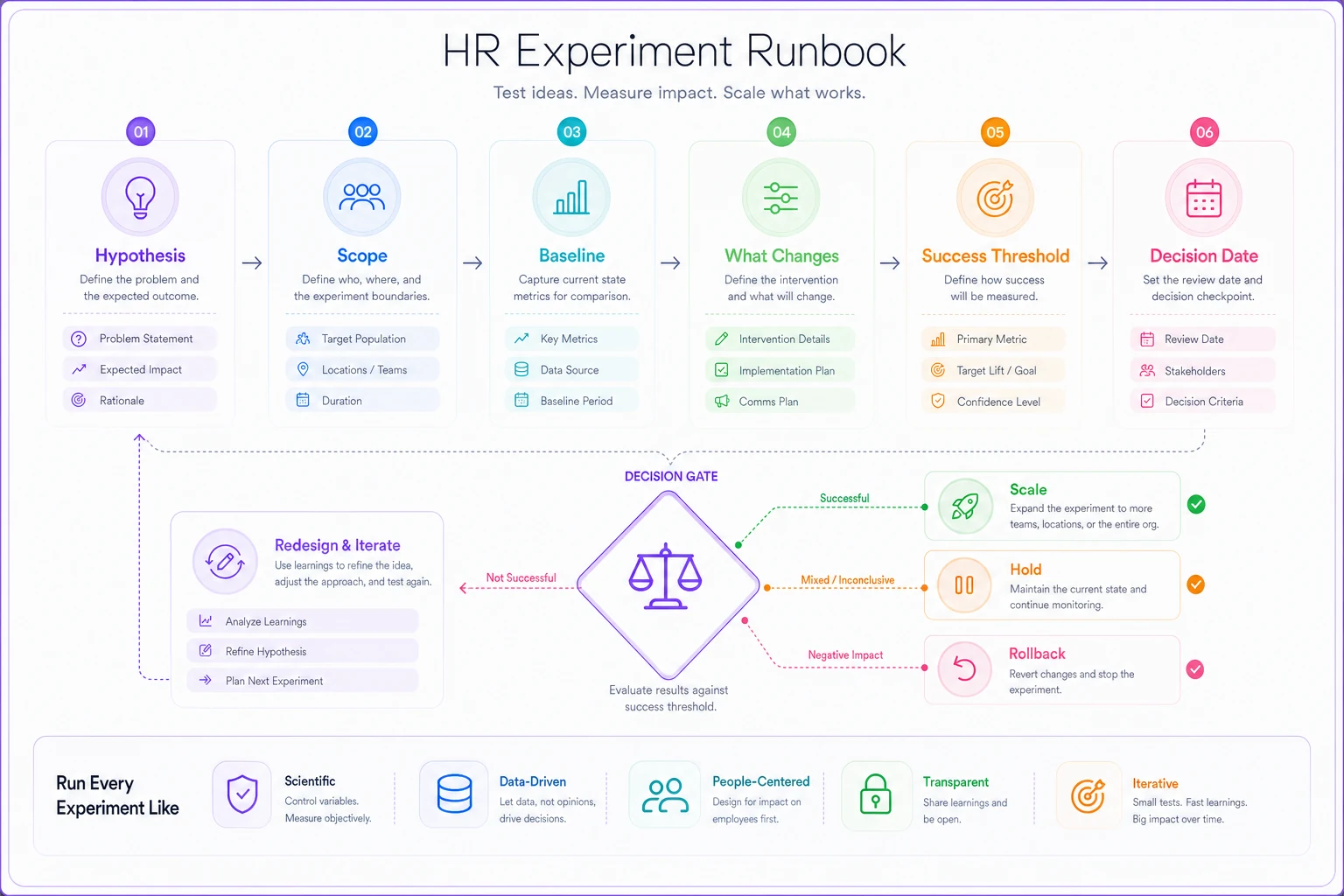
A short experiment runbook is a one-page document that answers:
-
Hypothesis — "Moving offer approvals into a staged flow will cut approval time by ~30% without raising exception rates."
-
Scope — one team, one region, 4 weeks. Specific enough that you can actually run it.
-
Baseline — the current numbers, captured before you change anything. If you don't grab the baseline first, you can't prove anything later.
-
What changes — exactly the one thing you're testing.
-
Success threshold — the number that decides whether you scale, hold, or roll back.
-
Decision date — when you'll make the call, so it doesn't drift forever.
Writing the success threshold before the experiment is what keeps you honest. Without it, every result gets rationalized as "kind of working."
Here's a simple runbook workflow:
A realistic example
A mid-sized company — roughly 400 employees, a recruiting team of six — kept losing offer approvals in email threads. Approvals took anywhere from 2 to 9 days depending on who was out of office, and a handful of candidates dropped during the wait each quarter.
They ran a 4-week experiment with one business unit. Baseline offer-approval time was about 4.5 days on average. They moved approvals into a staged flow with a defined SLA and status visibility, trained just that unit with three micro-modules, and named one process owner.
By week four, approval time in that unit was down to roughly a day and a half. Usage sat around 85% — a couple of managers still tried to email offers directly, which told them exactly where the friction was. Instead of scaling everything, they fixed that one friction point first, then expanded to the next two units. The rollout took longer on paper but stuck, and they weren't re-training the same people six months later.
The point isn't the specific numbers. It's that they had a baseline, a threshold, and a decision date — so scaling was a decision, not a hope.
SLA gates: how you stop silent decay
A new process doesn't fail all at once. It decays — a few exceptions here, a missed handoff there — until it quietly becomes optional. SLA gates are how you catch that decay before it spreads.
An SLA gate is a checkpoint where the process either meets a defined standard or triggers a response. For example:
-
If offer approvals fall below 80% SLA compliance for two consecutive weeks → the process owner is flagged and reviews why.
-
If shadow workarounds exceed a set threshold → escalate to the sponsor, because that's a mandate problem, not a training one.
-
If a stage consistently blows its SLA → that stage gets redesigned, not the people re-trained.
Gates should route to different responses depending on where the failure is. Low usage routes to sponsors and multipliers. Slow stages route to process redesign. Downstream errors route to training. Most teams respond to every adoption problem with more training, which is why they keep re-training and nothing changes.
Gates also give you a clean way to phase scaling. Don't expand to the next group until the current group clears its gates for a defined period. That single rule prevents the most common scaling failure — rolling out fast, hitting problems everywhere at once, and having no capacity to fix any of them.
When this level of rigor makes sense — and when it doesn't
Not every change needs a full operating model. Applying this to a minor form update is overkill and will annoy everyone.
When it makes sense:
-
The process crosses multiple teams or regions
-
There's a real cost to non-compliance (compliance risk, candidate loss, rework)
-
You've tried rolling something out before and watched it fade
-
Headcount is growing and undocumented processes are starting to break
When it's a bad idea:
-
Small, low-stakes changes affecting one person's workflow
-
Temporary or experimental processes you're not committed to
-
Situations where you don't have a sponsor willing to enforce the mandate — in that case, fix the sponsorship first, because no operating model survives without air cover
Who should not do this: teams that can't yet capture a clean baseline. If you don't have reliable current-state numbers, start there. An adoption program built on guessed baselines just produces confident-sounding conclusions that fall apart under scrutiny.
Where the software actually helps
Most of this can be run manually at small scale — spreadsheets, calendar reminders, someone chasing SLA compliance by hand. That works until you're running two or three change programs at once across a growing team, and then the tracking overhead eats the whole thing.
Workflow platforms with built-in automation earn their keep on the boring, repetitive layer: firing micro-training at the right trigger, tracking usage vs. outcome KPIs without manual data pulls, flagging SLA gate breaches automatically, and surfacing shadow workarounds instead of waiting for someone to notice. When adoption tracking runs on its own, the process owner spends time fixing friction instead of assembling reports — which is the difference between a program that's maintained and one that quietly decays.
Onboarding is where a lot of this comes together, since new hires are your best chance to embed a process from day one rather than un-teaching old habits. If you're building change into how people start, it's worth pairing this with a structured first-90-days onboarding blueprint with measurable milestones and manager checkpoints so the new process is the only process they ever learn.
The shift that actually matters
Change programs fail when they're run as events. They succeed when they're run as operations — with owners, baselines, gates, and a clear definition of what "adopted" means before anyone flips the switch.
The teams that get this right stop asking "did we communicate the change well?" and start asking "can we prove people are using it, and can we prove it's working?" Those are answerable questions. Once you can answer them, scaling stops being a leap of faith and becomes just the next contained step — and that's the whole difference between a process that sticks and one you'll be relaunching next year.
Ready to transform your HR processes?
Join thousands of HR teams using Hiryly to hire faster, engage employees better, and stay compliant effortlessly.