

Most HR teams treat their case backlog like a staffing problem. "We just need one more person on the shared inbox." That fix holds for maybe a quarter, then the queue balloons again. What's actually breaking isn't headcount — it's the absence of a real service-delivery model underneath the queue.
When you look closely at HR teams that drown in cases, the pattern is almost always the same: everything lands in one undifferentiated pile, everyone triages by gut feel, urgent things get buried under loud things, and SLAs exist only as a number in a slide deck nobody enforces. A benefits question, a manager asking for a comp exception, and a possible harassment report all sit in the same inbox with the same visual priority.
An HR service delivery operating model is the system that decides what enters HR, how it gets categorized, who touches it, how fast it must move, and what happens when it stalls. It's the difference between a team reacting to whoever emails loudest and a team that routes work deterministically. This article walks through how that system gets built — service catalog, routing matrix, triage tiers, automation-vs-human rules, staffing heatmaps, SLA scorecards, and escalation gates — and where each piece tends to break as you scale.
Start with the service catalog
Start with the service catalog, because you can't route what you haven't named
You cannot build routing rules on top of vague categories. "Employee questions" is not a category. It's a landfill. The first real work is defining a service catalog — the finite list of things HR actually does for people, each with an owner, a target speed, and a rough monthly volume.
A functional catalog for a mid-market team usually lands somewhere between 25 and 45 distinct services. Fewer than that and your routing is too coarse to be useful. More than that and nobody can find the right category, so they default to "General" and you're back where you started.
Here's a trimmed example of what a catalog looks like once it's structured:
| Service | Category | Default tier | Target resolution | Rough monthly volume |
|---|---|---|---|---|
| Payslip / pay discrepancy | Payroll | Tier 2 | 2 business days | ~120 |
| Benefits enrollment question | Benefits | Tier 1 | 1 business day | ~200 |
| Employment verification letter | Ops | Tier 0 (auto) | 4 hours | ~90 |
| Manager comp exception request | Comp | Tier 3 | 5 business days | ~25 |
| Possible policy violation report | ER | Tier 3 (gated) | Same-day acknowledgment | ~8 |
| Leave-of-absence setup | Leave | Tier 2 | 3 business days | ~40 |
| System access / HRIS error | Tech | Tier 1 | 1 business day | ~60 |
Build the first draft from a month of real tickets — tag them by hand if you must.
The insight most teams miss: your catalog should be sorted by volume × risk, not alphabetically. The high-volume, low-risk items — verification letters, address changes, PTO balance questions — are where automation pays off. The low-volume, high-risk items — ER cases, comp exceptions, terminations — are where you protect human judgment and never let a bot near the decision.
A common mistake is letting the catalog get written by one senior person in a conference room. The people who actually know what comes in are the ones staring at the inbox every day. Build the first draft from a month of real tickets, tagged by hand if you have to. You'll almost always find that 15–20% of your volume is stuff nobody thought HR was even handling.
Routing matrix
The routing matrix: turning categories into decisions
Eliminate HR bottlenecks with smart automation.
Hiryly simplifies your HR operations so you can focus on people, not paperwork.
- Centralized candidate tracking
- Automated onboarding workflows
- Performance & compliance dashboards
No credit card required
Once services are named, the routing matrix decides where each one goes. Most teams overcomplicate this. You don't need a 200-cell spreadsheet. You need a matrix built on three inputs: service type, requester type, and trigger conditions.
Here's a simple workflow view to make routing decisions explicit and auditable.
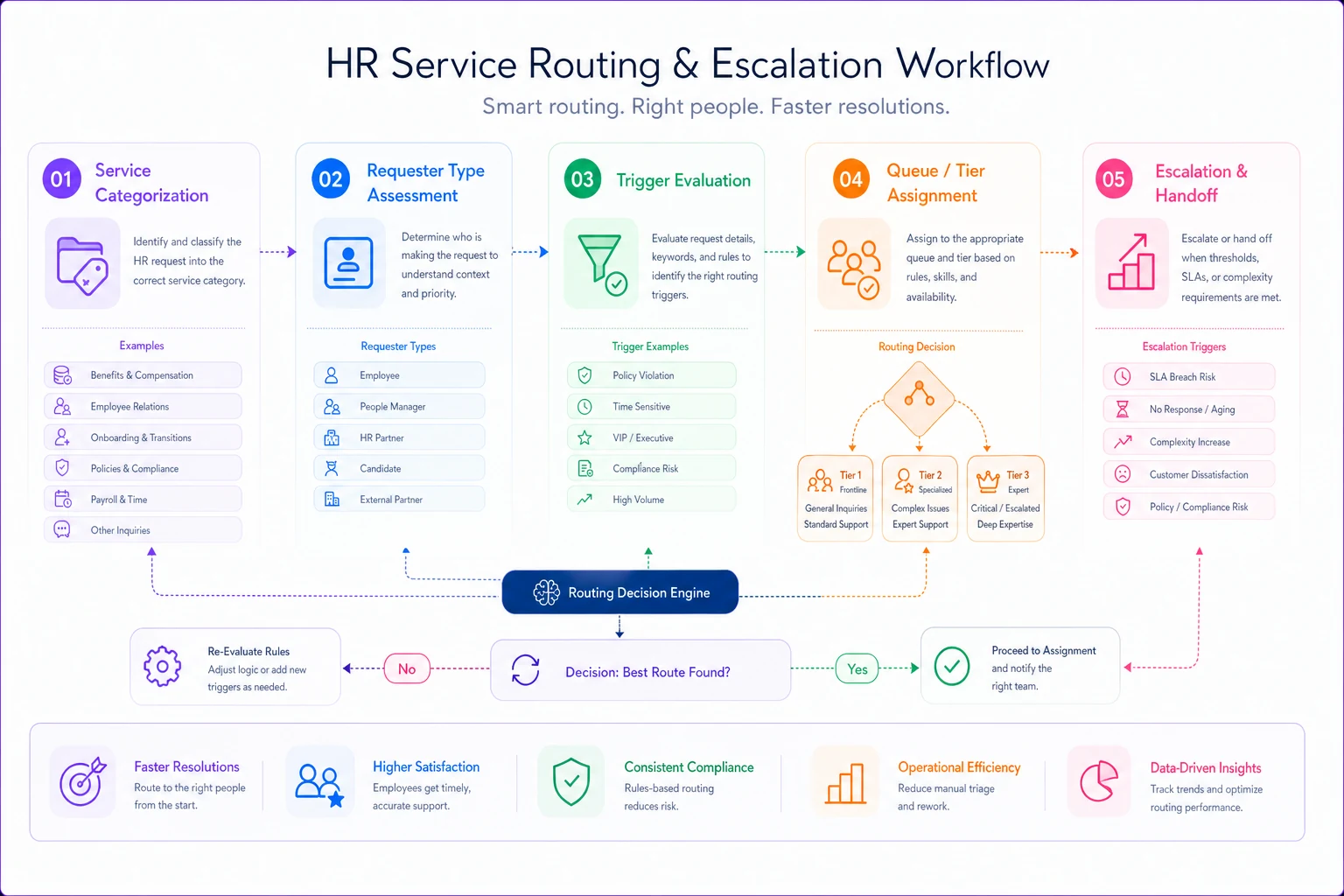
Requester type matters more than people expect. A payroll question from a frontline employee and a payroll question from a regional manager processing 40 people are not the same ticket. The second one has a blast radius. Your matrix should let requester type bump priority without a human having to notice.
-
Service type determines the owning queue (Payroll, Benefits, ER, Comp, Ops).
-
Requester type and trigger conditions determine the tier within that queue.
-
Trigger conditions are the flags that force rerouting — words like "harassment," "discrimination," "resign," "legal," or a request tied to an employee on a leave of absence or under investigation.
The trap at scale is that routing rules quietly rot. A team reorganizes, a queue owner leaves, a new benefits vendor changes the process — and the matrix still points cases at people or steps that no longer exist. Cases pile up in orphaned queues nobody owns. Build a quarterly review of the matrix into your operating rhythm, the same way you'd review a compliance-first HR operating model — routing rules are governance, and governance drifts if nobody maintains it.
Triage tiers
Triage tiers: four levels that actually mean something
Tiers only work if they map to real handling differences, not just a priority label. If your "high priority" and "medium priority" tickets get worked in the same order by the same person, tiers are theater.
-
Tier 0 — Self-serve / automated. No human touches it unless something fails. Verification letters, PTO balance lookups, policy-document requests, address changes. If this tier isn't absorbing 20–35% of your ticket volume, you're spending expensive human time on lookups.
-
Tier 1 — Frontline resolution. A generalist can close it with knowledge-base answers and no approvals. Most benefits and general questions live here. Target: same or next business day.
-
Tier 2 — Specialist resolution. Requires someone with domain access — payroll corrections, leave setup, HRIS fixes. Needs system permissions, not just knowledge.
-
Tier 3 — Restricted / gated. ER cases, comp exceptions, anything with legal or investigation exposure. These require named owners, documented decision rules, and often a second reviewer.
The pattern worth naming: teams under-invest in Tier 0 and over-staff Tier 1. They hire generalists to answer questions a well-built knowledge base and a few forms could handle, then have no bandwidth left for Tier 3 work that actually carries risk. The fix is to aggressively push repeatable, low-judgment work down to Tier 0 and keep experienced people for the cases where a wrong answer costs real money or creates legal exposure.
Automation vs human
Automation vs. human: drawing the line without getting burned
This is where teams either save themselves 30% of their manual load or create a compliance mess. The rule worth defending anywhere: automate the retrieval and the routing, keep humans on the judgment and the decision.
Automation is safe and valuable when the task is:
-
Deterministic — there's one correct answer (PTO balance, benefit effective date).
-
Auditable — you can log exactly what was sent and why.
-
Reversible — a mistake is easy to catch and fix.
-
Low-risk — no legal, comp, or employment-status consequence.
Automation is dangerous when the task involves:
-
Interpretation — deciding whether something counts as a policy violation.
-
Discretion — approving an exception, adjusting pay, closing an ER case.
-
Sensitivity — anything touching accommodations, health, discipline, or termination.
A practical dividing line: a system can draft, route, remind, and retrieve, but a human decides and sends anything with employment consequences. Where teams get into trouble is letting automation quietly make decisions — auto-closing tickets that went quiet, auto-approving exceptions under a dollar threshold, auto-classifying an ER report as "general question" because it didn't contain a trigger word. Those shortcuts feel efficient until one of them lands you in an investigation with no clean record of who decided what.
There's a similar tension in intake accuracy that shows up in onboarding work — the same discipline that makes a background check reconciliation SOP reliable applies here: automate the matching and flagging, never the adjudication.
Staffing-to-demand
Staffing-to-demand: heatmaps instead of headcount guesses
Most HR teams staff their service function based on total ticket volume divided by some assumed capacity number. That's why they're always slightly underwater — demand isn't flat, and neither is difficulty.
A staffing-to-demand heatmap plots ticket arrival by day-of-week and hour, weighted by tier. When you actually build one, the patterns are predictable:
-
Payroll queues spike in the two days before and after each pay run.
-
Benefits queues explode during open enrollment, then go quiet.
-
ER and investigation work is low-volume but arrives in unpredictable bursts, and each case eats hours, not minutes.
-
Mondays and the first business day after a holiday typically run 40–60% above a normal day.
Once you see the heatmap, you stop staffing for the average and start staffing for the shape. A simple capacity formula that works:
> Required agents (per tier, per window) = (Forecasted tickets × Avg handle time) ÷ (Available minutes × Utilization target)
Use a utilization target of 70–75%, not 100%. Teams that plan to 100% utilization have no slack for the Tier 3 case that suddenly consumes a full day, and everything else slips. A realistic example: if a Tier 2 payroll window forecasts 60 tickets at 18 minutes average handle time, that's 1,080 minutes of work. At 420 available minutes per person and 72% utilization, you need roughly 3.6 — so four people staffed on the peak payroll window, pulling down to two on a quiet Wednesday.
The mistake worth flagging: teams calculate this once and freeze it. Demand shape shifts every quarter as the company grows and processes change. Rebuild the heatmap quarterly against actuals, or it becomes fiction.
SLA scorecards
SLA scorecards: measure the ones you'll actually enforce
An SLA nobody enforces is worse than no SLA, because it trains the team to ignore commitments. The scorecard exists to make breaches visible and to distinguish between "we're slow" and "we're slow at the things that matter."
Track SLAs at two levels:
-
Response SLA — time to first meaningful human acknowledgment. Cheap to hit, hugely important for perception. A Tier 3 ER report acknowledged within an hour buys enormous goodwill even if resolution takes two weeks.
-
Resolution SLA — time to actual closure. This is where real operational health shows up.
A useful scorecard tracks, per service category: volume, % within response SLA, % within resolution SLA, median resolution time, and breach reasons. That last column is the one people skip and the one that actually changes behavior. When you tag why something breached — waiting on manager, waiting on vendor, waiting on internal approval — you usually find that HR isn't the bottleneck at all. A significant share of "HR is slow" breaches are actually managers or third parties sitting on a step, which is a completely different problem to solve than staffing.
Don't measure everything. Pick the 8–10 services that carry the most volume or risk and score those hard. Scoring all 40 categories dilutes attention and nobody acts on any of them.
Escalation gates
Escalation gates: the safety valve that stops silent failures
Escalation gates are the automatic rules that force a case to move up or out when it stalls or trips a risk flag. Without them, the failure mode is silence — a ticket sits, ages, and nobody surfaces it until the employee escalates to a VP or files something external.
-
Time-based a Tier 2 ticket at 80% of its resolution SLA auto-flags to the queue owner; at 100% it reassigns and notifies a manager.
-
Content/risk-based any ticket that trips a trigger word or involves a protected-class matter jumps straight to Tier 3 with a named owner and a locked audit trail, regardless of how it was originally filed.
The subtle failure here is over-escalation. If everything escalates, escalation means nothing and managers tune out the alerts. Tune the thresholds so that maybe 5–10% of cases ever hit a gate. If a third of your tickets are escalating, your SLAs are set wrong or your staffing is genuinely broken — the gates are just telling you the truth.
A real scenario
A real scenario: mid-market team, ~340 monthly cases
A services company with around 1,200 employees ran their entire HR support through a shared inbox and two overloaded generalists. Monthly case volume sat near 340. Nobody could say what percentage hit any SLA because there were no defined SLAs. Comp exceptions and a handful of ER matters routinely got buried under password resets and PTO questions.
They spent about six weeks building a service catalog — ended up with 31 services — along with a routing matrix keyed on service and requester type, four triage tiers, and a Tier 0 automation layer for verification letters, PTO lookups, and policy-document requests.
The shift was uneven but real. Tier 0 absorbed roughly a quarter of total volume within two months — work that had been eating a generalist's mornings. First-response time on the sensitive, gated cases dropped from "whenever someone noticed" to same-day acknowledgment, because those cases now jumped the queue automatically instead of waiting in line behind benefits questions. Resolution-SLA compliance on their top ten services climbed from unmeasured to somewhere in the low 90s within a quarter. They didn't add headcount. They redirected the two people they had toward the work that actually needed judgment.
The most telling change wasn't a metric. Managers stopped emailing the CHRO to complain that "HR is a black hole," because the escalation gates surfaced stalled cases before anyone had to chase them.
When it makes sense
When this model makes sense — and when it doesn't
Build this when: you're above roughly 150–200 employees, your case volume is genuinely mixed across categories, and you've got at least a couple of services carrying real compliance risk. The model earns its keep when the variety of work is what's overwhelming you, not just the raw count.
Hold off when: you're a small team handling 30–40 cases a month with two clear categories. A full catalog, tiering scheme, and heatmap is overhead you don't need yet. A shared inbox with two labels and one clear owner is fine at that size. Building elaborate routing for trivial volume is a system heavier than the problem it's solving.
Who should be careful: teams in the middle of an HRIS migration or a reorg. Layering a new operating model on top of shifting systems and ownership tends to produce two half-built models that fight each other. Get the underlying structure stable first — the same reason most HR change programs fail is that they bolt process onto a moving foundation and can't prove adoption.
Maintenance discipline
The part everyone underestimates
The catalog, the matrix, the tiers, the heatmaps — those are the visible parts, and honestly, they're the easier parts. What actually determines whether this works is maintenance discipline. Routing rules rot. Demand shape shifts. New services appear that nobody adds to the catalog. SLAs get quietly ignored until they're meaningless.
A service-delivery model isn't a project you finish. It's a small quarterly ritual: rebuild the heatmap against actuals, prune dead routing rules, re-score the SLAs that matter, retune escalation thresholds so they still mean something. Teams that treat it as a living system keep the gains. Teams that treat it as a one-time build watch the queue slowly refill until they're back to hiring one more person for the inbox — and wondering why it didn't fix anything the last three times either.
A service-delivery model isn't a project you finish. It's a small quarterly ritual: rebuild the heatmap against actuals, prune dead routing rules, re-score the SLAs that matter, retune escalation thresholds so they still mean something. Teams that treat it as a living system keep the gains. Teams that treat it as a one-time build watch the queue slowly refill until they're back to hiring one more person for the inbox — and wondering why it didn't fix anything the last three times either.
Ready to transform your HR processes?
Join thousands of HR teams using Hiryly to hire faster, engage employees better, and stay compliant effortlessly.